Online Video Publishing [dot] com

How Can a Small Business Get ROI From Video?

Guest Post by Neil Davidson, Mywebpresenters 

Many small business owners and marketers will have heard the hype surrounding video marketing. This time the hype is also backed up by some compelling figures. According to recent research by Nielson, 26.9 million UK individuals consumed online video in April – that is about 40% of the population.

While that’s all very well, we know that the majority of video ad views will belong to well known brands with deep enough pockets to have a punt at large scale online video without having to batter an eyelid should they not receive a direct return on their investment. So how about the rest of us? Can a typical small business see verifiable (and direct) results from using video?

What are your aims?

Video is no different to any other marketing channel; it needs to be a working cog that plays its part in achieving the company’s broader goals. For example you may have too slow a process for closing leads due to your product being a high cost product or perhaps there are trust issues in your market so it may be helpful to add customer testimonial videos onto your product pages to help improve your performance in these areas.

Marketo is an example of a business doing customer testimonial videos well. Alternatively you may have issues with people understanding exactly what your product does and how it can help them.

A good example of a small business doing this well is Harvey Water Softeners they have a number of videos throughout the site that explain how water softeners work and the health benefits of using them.

There are also plenty of businesses who have used video to achieve their goals more effectively. Take the Khan academy for instance: they have revolutionized education meaning that children all around the world can learn at their own pace, support others who need help and get help from others who are already clear on certain subjects: Here is an overview video from TED’s YouTube channel.


Our specialty is using video Web Presenters and we find that these are possibly the type of video that carry the lowest costs in production and are the easiest to get up and running quickly. To give you an example with figures: The National IT Learning Centre increased the website bookings for their courses by 35% through the use of the web presenter video which you can see on their homepage above.

So, initially you must define where you are as a business and what your current short to mid term goals are, then once clear determine if video can or cannot play a part in helping you to achieve those goals. I am of course biased but I would be happy to take the challenge of finding a practical way for any business owner to use video effectively to achieve their business goals.

Video is simply a medium for communication and because it helps to visually rather than textually convey your message it is generally effective as many people respond well to visual explanations.

Set Targets

Once you are clear on your aims for video production and marketing you should set yourself some clear targets that will measure how close you come to achieving your aims. In the first example above where I talked about video testimonials there may be 2 measurements that you could use:
  1. lead to sale conversion time lag shortening
  2. increase in the number of leads
Whereas for the second example it is more likely to be a clear-cut matter of the number of additional leads gained versus costs of the video production. It is worth taking into account that the videos will probably be good for a few years use in both cases. An additional measurement in both cases could be site conversion rate.

Keep it Real

Whatever type of video that you are producing it is important that you speak from the heart, insincerity (bullshit) is easier to spot on a persons face or in the tone of their voice than it is in text. Your pride in your business needs to come across, of course not in an arrogant way but in a passionate way. If you are excited about the things that your business is doing and are obviously keen to share it with others then the response you will receive is likely to be positive.

If you are producing customer testimonial type videos then give your customers a short list of possible points to cover that will really get them talking, e.g.

What advise would you give to other potential users of this product in hindsight?

Use natural language that suits you, do not try to be the person you think your customers want to see, just be confident in yourself that you have something worthwhile to share and be yourself.

What results can be expected?

We have produced video for a wide range of different businesses and have seen many positive results and some not so great results. The difference between success and failure usually comes down to the strategy behind the video production and use. If there is a clear aim and this is being fulfilled by the videos well then they usually work.

Obviously not a small business but Virgin Holidays managed to increase the upsell of their upper class seats by 30% due to a single web presenter video. This resulted in an additional £4 million in revenue for Virgin.

As mentioned above The National IT Learning Centre increased the website bookings for their courses by 35% and many more small businesses have had similar results.

Bespoke (personalized or tailored) web presenter videos vary in price depending on the complexity but start at £597. Many companies offer cheaper, off the shelf options for less. Sitepal for example offer avatar style videos for less than £50. In fact we have also trialled generic web presenter type videos but found that the response rates to the generic rather than bespoke videos were disappointing so are now focusing solely on improving the efficiency of our bespoke video services.

Guest Blogger Bio
This post was written by Neil Davidson, CEO of Mywebpresenters who are a video production company specializing in corporate video for the web. They are also the pioneers of video web presenters technology. If you would like to have a conversation about how to tell your corporate story then please email Neil at neil.davidson@mywebpresenters.com.

Video Editing on the Cheap

You don't need expensive video editing software to tell your story, as Jonathan Wylie of PC World, points out in his recent article, How to Edit Video on the Cheap | PCWorld. Wylie says, "Buying the latest, greatest high-def camcorder or Digital SLR camera can be expensive, but the software you use to edit your footage doesn't have to be. A number of free or low-cost video editors do a very respectable job of prepping your home movies for sharing with friends, family, or the rest of the world."


Wylie shared these four options to edit your video on the cheap:
  1. Windows Live Movie Maker - "Microsoft's Movie Maker has been available at no charge for years, but the latest Windows Live version is a very respectable video editor. In addition to the usual basic editing tools, Microsoft Movie Maker lets you add video themes, music, titles, and credits--and apply a few transitions, some pan and zoom effects, and various visual-effect filters. You can publish finished projects to Facebook, Flickr, and YouTube, or export them to your hard drive in 1080p HD or any of a range of other resolutions. If you've invested in a great HD camcorder and you're editing on a budget, Windows Live Movie Maker is a great tool to start with."

  2. Video Spin - "Pinnacle’s Video Spin is another smart choice if you're on a tight budget. You can download it for free and take advantage of Video Spin's straightforward interface to edit video quickly and efficiently. You can split, trim, or combine movies, and add transitions, text, and even a soundtrack. Not all features are free forever, though. After 15 days, you'll have to buy different codec packs (for around $15 each) to continue editing certain video formats."

  3. Serif MoviePlus Starter - "Serif launched MoviePlus Starter as a free version of one of its more advanced video editors. The Starter edition is far from the most full-featured video-editing software you can buy, but it'll do the job unless you're looking to edit a blockbuster movie. You can use MoviePlus Starter to insert fades, wipes, and transitions, as well as to fiddle with captions, titles, and credits. You can experiment with a "picture in picture" effect, add three (or fewer) video or audio tracks at once, and edit your video content quickly and easily. Beginners will love the built-in help system and the simple drag-and-drop interface."

  4. YouTube - "Editing video online might not be an ideal scenario, but if you're already in the habit of uploading lots of clips to YouTube, you may find it easier to do your editing with YouTube's own online video editor. The new YouTube editor lets you trim the beginnings and ends of videos, and adjust the brightness, contrast, and color to your taste. The editor includes a video stabilization feature to help reduce the shakiness of handheld footage, and it has 14 style effects like black-and-white and sepia. Once you've finished editing, the YouTube editor's software makes posting your projects to your YouTube account and sharing them with others very easy."

Wylie left out iMovie, the obvious choice for Mac users video editing application that ships free with all Apple computers. iMovie '11 has all the same features as the rest of these applications and has an easy learning curve once you get comfortable with the interface. 

Is there a cheap video editing software that you can suggest? Let us know in the comment section of this post.

5 Shooting Tips for Streaming

According to Jan Ozer, streaming media expert, author and Publisher of the Streaming Learning Center, there are a number of things to consider when you are shooting video for streaming. Ozer says, "Anyone who’s ever picked up a camcorder and tried to tap into their inner- Spielberg knows that there’s a lot more to creating a high-quality, impactful movie than turning on the camcorder and pressing the red record button. The same is true with producing video for streaming." (From Shooting for Streaming - Five Key Tips)

Ozer says that high quality production value is important to keep your audience's attention focused on your message and not your mistakes.

"Sure, you can attach your $600 consumer camcorder to a tripod, connect it to your computer, and produce streaming video, but will the quality enhance or detract from your content? Will it look and sound as good as the streaming video produced by your competitors, or other videos your viewers watch online? Fortunately, you don’t need Spielberg-like skills to produce high-quality streaming video, but to optimize the quality of your training or classroom video, it’s important to follow certain best practices."

The following is a summary Ozer's five best practices for producing high-quality video. Read his full article for more details from his website Streaming Learning Center for other helpful streaming media tips and resources.
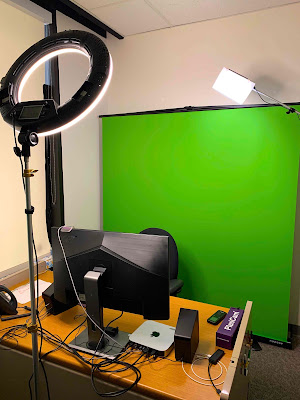
  1. Choosing a background - "When a video has lots of detail in the background — like bookshelves, a finely patterned wallpaper, or blowing leaves — the codec can’t tell whether you care about the subject’s face or the extraneous stuff in the background. So it tries to preserve the quality of all the content in the frame, which inevitably degrades the quality of what you care most about."

  2. Lighting the set - "In terms of lighting style, you can use three-point lighting, which produces slight shadows on the face, or flat lighting, with no appreciable shadows. Either way, the most important priority is to provide sufficient lighting for the camcorder to achieve good exposure without injecting gain into the video."

  3. Camera usage and selection - "If you’re shooting in a controlled environment, like a classroom or conference room, it’s best to move that camera out of automatic mode, and control exposure manually, which fortunately is easier than it sounds. Basically, there are three controls that control how much light gets to the camcorder’s sensing device; shutter speed, gain, and aperture."

  4. Framing the shot - "The Rule of Thirds is a principle of photographic image composition that can also be applied to shooting video. Imagine the video frame divided into thirds, both horizontally and vertically like tic-tac-toe board. If the subject is facing the camera, the top horizontal line should be at eye level and they should be in the center of the frame." 

  5. Don't forget about audio - "Don’t skimp on the audio side of the equation. Viewers accept some visual degradation in their streaming media, but not audio-related deficits, since they know that audio can be nearly perfect, even when delivered via streaming."
Visit Ozer's site for more Streaming production resources and buy his book, Video Compression for Flash, Apple Devices and HTML5, a professional reference for producers seeking to distribute video over the Internet and to mobile devices—particularly Apple iDevices.

Online Video Sets Automotive Trends such as Hellaflush

If you are an automotive enthusiast, you will quickly recognize the phrase "Hellaflush". It has become synonymous with modified cars and trucks that have aftermarket wheels that are flush with the fender. This might not seem like a big deal to the average Joe, but to the auto enthusiast, especially import enthusiasts, Hellaflush has become a trend that looks like it's here to stay. 

Online Videos posted to YouTube, Vimeo and others, show the trend at work that drives up interest, excitement, and viral videos. Here is an example of a video dedicated to the Hellaflush movement that has been posted to YouTube:


As you can see from the above video, this automotive trend is very popular, and is catching on every day. Online Videos like these give inspiration to average enthusiasts to turn their cars into something special. 
 
Getting your car Hellaflush requires a lot of research to ensure that the wheels and tires you purchase are the correct offset to make it sit just right when lowered. The tires also come in to play as each tire manufacture has different tire designs and this can make or break the stance of your car. The suspension is also very important and needs to give your car proper clearance. Popular suspension setups such as KSport Kontrol Pro Coilovers and Blackworks Coilovers have been used to create optimal stances. Seeing a video of the same car you have that is hellaflush gives you creative ideas on creating that look for your car or truck.

About the author - Alex Polonsky
Alex Polonsky is an automotive enthusiast that blogs over at APtuned (http://www.aptuned.com/blog/) where he talks about the latest trends in automotive high performance. Alex has been in the automotive industry since 1999 and has a passion for online video, technology, and social media. Alex is also co-founder of VidCompare.

Pre-production: 10 Exercises To Consider (before touching a camera) For Best Video Results

Guest Post by Seth Kenvin, Market7

Working with video as a medium is cool. Professionals take pride in mastering crafts of shooting, editing, imparting effects. People from outside the field who occasionally participate by commissioning production, appearing on-screen or weighing in on direction of projects also get gratified as rich content comes together. This blog is full of enticing advice about picking cameras, achieving right light and sound levels, and transcoding. But some of the most important work for making great video can happen before any of those considerations. Like stretching before sports, like taking vitamins before breakfast: aspects of careful pre-production may be dull but are often essential for great video results.

In fact, without the right sort of pre-production in advance, a fun project with cool content seeming to be heading towards a hit deliverable can become suddenly derailed with realization of some oversight: the most important decision maker was never consulted about what to emphasize, getting verbose content to fit within allotted running time necessitates an editing hack job, the featured product does not appear because nobody had responsibility to bring it to the set.

Some aspects of pre-production can be as fun as working with video gear and video content, some can be drudgery, but all can be essential for a production's success, so consider the following list (appropriate as lists are constants during pre-production) and which exercises are vital for your project.

1) Review, discuss, revise, approve: Not a singular step, these are constants throughout pre-production, and post-production too for that matter. Video projects are multi-handed, multi-staged, and multimedia and it's rare that some single perspective on how to do something can't benefit from someone else's viewpoint. So, for each of the nine following steps, remember to circulate to stakeholders, consider their inputs, resolve differences, and continuously improve for best outcome.

2) Treatments: Video production is ultimately a creative process, even though aspects of pre-production are much more logistical, but a creative step up front provides great foundation. Treatments are brainstorming exercises: come up with a handful of ideas, expressed very briefly (a couple sentences &/or a quick sketch) for what's to be produced and have a team conversation building off of those to get project oriented.

3) Brief: As the high-level concept gels, it's time to start breaking down details to assure nothing essential is overlooked. What is the key message? When is this due? Who will be in the audience? A creative brief is a question & answer exercise for consensus on these considerations as guidelines to abide throughout production.

4) Schedule, Budget: Knowing constraints up front helps make best decisions and helps stay grounded within realm of possible. The most fundamental constraints are time and money. A good brief may establish when delivery of video is due and how much overall funding is available, then diligent scheduling and budgeting seeks to best pursue priorities while allocating within those factors. How many iterations of script writing can be accomplished before a shoot has to happen? What sort of set can be afforded?

5) Script: On top of the math in scheduling and budgeting, if the production is scripted, writing is required too. Those who like the sizzle of capturing and seeing video may find this part of the process the most dreary. It can be important to have someone involved who thrives on writing. This is another activity to abide by constraints that may be established in the brief: write a script that fits within planned running time (but perhaps long enough to allow for some optimizing edits later). Also, scripts are for video – in addition to dialog, they can describe visuals such as appearances of people, props and sets and the on-camera movements and changes of those.


6) Storyboard: This can be where the process starts to get fun again for those stimulated by visual artistry. Storyboards don't have to be fancy or time consuming to create. They're basic depictions of the anticipated look of the video vital for a couple reasons: to assure consistency with the appearance that's sought, and to guide selection of what to use and how it all should be situated.

7) Cast, crew, location scouting, equipping: Well developed notions of themes, constraints and what a viewer will see and hear, all of which can be established in the steps described above, provides great guidance for final selection of who, what and where are involved in the project. As concepts mature clarity is gained on questions such as what particular specialized skills may be required, whether to source talent through an agency, and if shooting is best in-studio or on-location. Making these decisions at the right time, neither too early nor late, best assures the right people and things to be both in front of and behind camera (including what camera to use) to meet project's objectives and abide by its constraints.

8) Assign tasks
: As the team comes together and the shoot approaches, the volume of details to be addressed can skyrocket and assuring coverage of them can be vital. Video productions are distinctive versus other kinds of creative projects by the shoot representing something of a deadline in the middle of the project – it's when costs are highest and timing is tightest. If some important preparatory step is overlooked the whole project can be substantially compromised like wrong content being captured or another shooting day having to be scheduled. It is
vital to assure, and often to double-check, that all of myriad requirements are being addressed by capable people.

9) Rehearse: This is another case of deference to the time and cost sensitivity during the actual shoot. Too frequently, rent and wages are paid for idle locations, equipment and crew people while the on-screen talent becomes familiar with the lines on the set. Professional actors tend to prepare, although it may be important to establish timing and chemistry if there are several of them. Non-actors appearing on-screen, like a company's executive spokespeople, are frequently the real problems and in addition to knowing what they're going to say, they need preparation to speak at compelling pace, volume, pronunciation and inflection, and to appear with good posture and looking in right direction, and to be relaxed. Time coaching and practicing with them in advance can reduce one of the biggest variability factors of the shoot.

10) Call sheet: The highly logistical processes of pre-production can kick off with the stylistic exercise of treatments, and likewise the highly stylistic processes of capturing and editing content can be best prepared for with the highly logistical step of circulating a call sheet as culmination of pre-production. Call sheets are in a time-tested (as in decades, probably close to a century) format that condenses the final assurance that people know where to show up, when, how, with what, and answers all the other key question words. For those who haven't been having fun yet (and I hope this list indicates at least a few cool opportunities along the way of pre-production even to such people), circulation of the call sheet should signal that the really cool stuff's about to start.

Images courtesy of Videomaker.com

About the Author - Seth Kenvin
Seth KenvinSeth Kenvin is CEO and founder of Market7, a provider of web-based software for collaboration in the development and management of creative content. He was previously was VP strategic marketing and corporate development for BigBand Networks from founding through profitability and more than $200 million of revenues. While there, he managed financial transactions, customer and partner relationships, and marketing of the company’s network infrastructure platforms for rising quality, variety and volume of video services. Earlier, Seth was a principal for the VC firm Cedar Funds since its founding as well. Prior experience includes being an associate for the VC firm Venrock Associates, consultant to the software company Check Point Technologies, senior editor for The Red Herring magazine and corporate finance analyst for the high tech group of Bear Stearns. Seth is a dedicated writer who has been a monthly columnist, blogger, by-line contributor to multiple magazines, and author of more than a dozen white papers published and presented at conferences. He holds bachelor’s and master’s degrees in engineering from Cornell and an MBA from Stanford. Seth occasionally quotes Elvis Costello lyrics and scribbles notes about what’s going on in his life at http://twitter.com/sethkenvin.

3 Tips When Shooting Your First Promotional Video

Guest post by Marian LaSalle, Painted Path Designs

If you're a small business owner or want to communicate with an online audience, you should consider video marketing. I proudly present my Top 3 Tips for Producing Your First Online Marketing Video

1. My first tip is to pay attention to sound.

If you're using a flip cam or a similar video camera, make sure you're in a quiet location so the background noise doesn't bother the viewer. Unless you are shooting a music video, it should be quiet around you. Before you start filming, make sure that you are not going to be interrupted by cell phones, barking dogs, or people chatting in the background. Also make sure your camera is close enough to the subject that you will be able to hear them clearly.

If you're using a camera that will allow an external microphone, look into these sound enhancing options. Shotgun mic, Lapel mic, handheld mic or a wireless external mic.

2. Be short and to the point.

Do you know what WIFT means? It means your viewers want to know what's in it for them so, get to the point right away and then share your information later. Present your message with your audience in mind. Time is valuable and let's face it, if they get bored they will click you off and be on to the next video with-in the first 20 seconds. They don't want to waste time watching a hard sales pitch, a boring commercial or a misleading message.

3. Call to Action.

Make sure you include your contact information and give them a good reason to visit your store, call you, like you on your Facebook business page, sign up for your FABULOUS newsletter or visit your informative website. Think of other ways they can connect with you too like: following you on Twitter, reading your blog or asking a question in an email. Encourage your viewers to follow-up with you in a quick and easy way.

Video can be a powerful tool in communicating with your customers and potential customers too. Just this week I received a glowing testimonial from a client who said he's thrilled about the new clients he's getting from the video's we produced for his website. He's had such an increase in business he's asked us to record a video every month for him. The first video we shot was an introduction on his front page so people could get to know him. Know, Like and Trust is what your customers want and video is the easiest way to accomplish this.

If you have any questions or would like to see some of the videos I have produced, please visit my website and if you like what you see, contact me so we can talk about your online success.

Marian LaSalle
Painted Path Designs
Web Design & Internet Marketing
Video Introductions for your website and YouTube

Connect with Marian on-line
www.facebook.com/marian.lasalle

This article first appeared on: http://EzineArticles.com/6291203

How to Decrease Video File Size with MPEG Streamclip - Chris Pirillo, LockerGnome's Tech Reviews, News, & How To

This video comes by way of tech geek extraordinaire Chris Pirillo, as part of his mobile Q&A sessions which he recorded with his iPhone that was mounted on the dashboard of his Prius. He answers the question, "How to decrease video file size" and offers the following advise:
  • Keep in mind that anytime you decrease the file size of you video, you are also decreasing the quality.
  • Look at originating profile as a frame of reference (resolution, bit rate, codec, frame rate, audio settings, etc.)
  • His favorite video encoder of all time is MPEG Streamclip, a free open source video conversion tool for Mac or Windows. While it's not perfect it is easy to use. 

"Video, especially with HD content, can take up a lot of space on your hard drive. Thankfully, there are some easy ways to compress these large files down to a smaller size without doing much to degrade the overall quality." 

Blip.tv also recommends MPEG Streamclip for exporting your Source/Master copy as a Quicktime file for the best result with the following settings:
  • Frame Size: 720 x 480 (1280 x 720 if you have a Pro account and would like an HD version as well)
  • Video Codec: H.264
  • Audio Codec: AAC
  • Video Bitrate: 3.5Mbps - 5.0Mbps
  • Audio Bitrate: 128 Kbps
  • Fast Start Enabled: Yes
For more on specific video profiles to use of online and mobile video, check out these Apple Support Community discussions
YouTube is also full of a variety of videos on this subject, and there are a few good tutorials on using MPEG Streamclip
Download MPEG Streamclip: http://www.squared5.com/

Online Video for Motorsports made easy with the GoPro HD

Online Video for Motorsports made easy with the GoPro HD It's never been easier to get motorsports action converted into online video. Before, enthusiasts would need to strap a makeshift camera to their roll cage or interior bars to be able to record the action to later show off on YouTube or Vimeo. 

Just recently, GoPro, a maker of wearable HD video cameras for sports, released a high definition version for motorsports, called the HD MOtorsports HERO. GoPro makes it easy to mount the HD Motorsports HERO to your helmet, car, ATV, motorcycle, boat or ATV that you can easily upload to YouTube for sharing with friends and family. 

Sample video from GoPro:


The GoPro makes a perfect gift for those who like car gadgets and car parts because it gives the user the ability to document the competition and then share it. Online Video such as this has also helped performance shops document car builds and show people around the country, and even in other countries what their shop can do. 

Online video has been a big driving force in recognition for performance shops, and units such as the GoPro HD is making this easier. Before, people would take videos with their iPhones or other devices and then upload them to YouTube, but the picture quality was very low. However, GoPro can take 1080p video at 30 fps with incredible audio. Another incredible feature is a still shot feature, so you can take pictures as well as video.

About the author - Alex Polonsky
Alex Polonsky is an automotive enthusiast that blogs over at APtuned (http://www.aptuned.com/blog/) where he talks about the latest trends in automotive high performance. Alex has been in the automotive industry since 1999 and has a passion for online video, technology, and social media. Alex is also co-founder of VidCompare.

Are You Flipped Out About the Flip?

This article Are You Flipped Out About the Flip? originally appeared on Reel SEO  on Saturday, April 16, 2011.

Sometimes products come along that just simply hit the mark. Whether it's based on filling a business or consumer need, or for its ease of use, innovative simplicity or aesthetic quality, these products have helped shape that industry. They've also spawned competition within its market which has given us more choices andbetter products. But that particular product, while it may not be the first, will be remembered as the one that defines that market space. 

Such can be said for Flip Video camera, which met its unfortunate demise earlier this week. Just as Cisco surprised everyone with its $590 million purchase of Pure Digital, the makers of the world's most popular pocket video camera, just 2 years ago – the networking giant stunned the masses with its announcement that it would be shutting down the Flip Video business unit and kill the popular consumer device. 500 Cisco employees from the Flip Video business unit unfortunately would also be trimmed from their ranks as part of the company's consumer business restructuring plan.

Why Kill the Flip?

Cisco CEO John Chambers had sent out a memo the week before admitting to employees that they had disappointed investors and confused employees and that the company needed to get back on track and refocus on its core offerings. The company had seen several quarters of disappointing results and its consumer market strategy had faltered with its recent TelePresence product Umi, which it will stop selling through resellers and will be folded into the company's Business TelePresence product line. But while the Flip Video cameras were still selling like hot cakes and represented 35 percent of the camcorder market , Cisco's CEO said that they would need to retrench and make some "bold changes." He followed up this week by saying:
"We are making key, targeted moves as we align operations in support of our network-centric platform strategy. As we move forward, our consumer efforts will focus on how we help our enterprise and service provider customers optimize and expand their offerings for consumers, and help ensure the network's ability to deliver on those offerings."

Reaction to the News

The announcement was met with mixed feelings throughout the Internet, with many eulogizing the consumer device that revolutionized the camcorder industry and became an easy to use tool for online video publishing. Many have pointed out that the rise of HD recording capabilities in the iPhone 4 and the Droid have eroded then Flip's market share and triggered its decline. One the big drawbacks of the Flip has been the inability to capture good quality sound. The lack of a microphone input jack really limited it to being more of a "one trick pony" consumer device unlike its competitor the Kodak's Zi8 which includes a mic input jack, 1080p recording and an HDMI connection. 
Video producers around the world rejoiced its demise because it meant that PR professionals and marketers could go back to their old jobs and leave the video production to professionals. 

The Ragan Communications blog asked, Did Flip flop? Many communicators say popular digital cam’s time had come and noted that some will miss a great video tool, but most agree it wasn’t irreplaceable in the changing world of internal communications. New York Times columnist David Pogue expressed his dismay at the demise of the Flip – a product he loved for its simplicity and strength – calling it a tragic death of the Flip

According to Pogue, smart phones didn't kill off the Flip because of the 1 billion cellphones sold annually, only 1 million are iPhones and most cellphones don't even record video, let alone HD video. Pouge noted that Chambers' quote about the company refocusing on its core business to make “key, targeted moves as we align operations in support of our network-centric platform strategy” really meant, "We had no clue what we were doing.” 

Both Om Malik and Kara Swisher spoke with Jonathan Kaplan, CEO & Founder of San Francisco-based Pure Digital, who had recently departed from Cisco, about why Cisco may have killed the Flip. While Kaplan declined to comment he did say people still want single purpose devices. Kaplan told Swisher that, “Flip changed the world. The brand will always live….So I don’t think of it as such a bad day.”

Did you say, FlipLive?

Pouge said that the tragic death of the Flip was compounded by what he learned from a Flip product manager a few days prior to the untimely announcement, that the Flip was planning to release FlipLive, a new feature that would enable the Flip to do live video broadcasting to the Internet from a Wi-Fi hot spot.
"Think how amazing that would be. The world could tune in, live, to join you in watching concerts. Shuttle launches. The plane in the Hudson. College lectures. Apple keynote speeches. Or your relatives could join you for smaller, more personal events: weddings, birthday parties,  graduations, first steps. And the FlipLive was supposed to ship on April 13. The day after Cisco killed the Flip."
This was a feature I had long thought would make the Flip a unique device with live streaming capabilities of a smart phone with applications like Qik, Ustream, Livestream and others. But now, it appears we won't seeing that feature and will have to rely on our mobile devices for that.

RIP Flip

The Flip had a number of competitors and in his article, Death of the Flip camcorder doesn’t mean camcorders are obsolete, Paul Riismandel (the medigeek) wrote:
"Prior to the introduction of the Flip there had been a few attempts by electronics makers like Panasonic and Samsung to introduce small flash-memory camcorders which failed to take hold in the market. Sanyo was actually an early success story with its Xacti line of standard def and HD camcorder, though never a runaway success like Flip.  While Flip caught its competitors by surprise, that first-mover advantage didn’t last very long. Within a year Flip had created its own market segment, challenging Sony and Kodak, in particular, to jump into the palm-sized camcorder market with both feet. Sanyo answered the challenge by reducing the price on its Xacti line while retaining higher-end features like an optical zoom lens and flip-out screen. Even though Flip remained on top, these other manufacturers soon were nipping at its heels."
Like Pouge, Riismandel doesn't think the rise of HD recording in smart phones had a huge affect on the Flip's market share and that it was rather a victim of its own success. It was caught in a bad marriage with a technology giant that didn't have success in the consumer market and chose to close down the business rather than sell it. Some have said that Cisco really may have wanted its intellectual property rather than extending its success in the market. Personally, I hope we see the Flip resurrected in some form or another. The fact is, it's a simple device to use with only a few steps (1) Turn on (2) Press red button to record, press again to stop (3) Insert USB into computer to download, edit and upload. As evidence below of my first Flip video which was shot by my daughter who was 10 years old at the time. 

The Flip's biggest drawback was its lack of a microphone input jack, and as a video professional I criticize its shortcomings in the audio department, but it really did help revolutionize the pocket camcorder industry with its simplicity and size. I have three Flips, but stopped using them when I got a Kodak Zi8 mainly because it has a microphone jack. But the Flip challenged the industry and pushed smart phone makers like Apple, Samsung, HTC and others to make devices with HD video recording capability which many have said was part of its decline. That may be true to some degree, but it really comes down to the fact that Cisco failed at the consumer market because at its core it's really a B2B company and not a B2C company. 

So ends the saga of the Flip Video Camera... whether you loved it or hated it, may it rest in peace.

See this article on Reel SEO - Are You Flipped Out About the Flip? to join the conversation.

Create Original Animations with YouTube Create

YouTubers upload more than 35 hours of video to the video sharing website every minute, and with the motto of "Broadcast Yourself", YouTube has now made it easier for people who don't have a video camera join the fun. With the beta launch of youtube.com/create anyone can use video creation sites XtranormalStupeflix and GoAnimate to make their own videos or animations and post them directly to YouTube. 

These third-party video sites are not new, but many video creators may not have known that they existed, and now that they are available on YouTube they're sure to have more exposure and may gain traction among users. Whether this is good or bad for online video remains to be seen, since it could mean another 35 hours of user generated video uploaded to YouTube per minute. Google plans to add more services and partners in the future.

GoAnimate

GoAnimate is a fun app that lets you make animated videos, for free, in just 10 minutes, without having to draw. You can even create your own cast of characters. here are millions of people using GoAnimate. Try it out nowby GoAnimate


Stupeflix Video Maker

Tell a story with your digital content. Mix pictures, videos, maps, text, music and watch Stupeflix produce a stunning video in a few seconds. IIt's fast, easy, and free to try: you don't need to create an account, and videos are free up to 60 seconds.by stupeflix

Xtranormal Movie Maker

Xtranormal lets you to turn anything you type into a fully-animated CG movie. Set up your scene, type in your script, and animate it instantly. Easily share something funny with friends, or create the next viral sensation. If you can type, you can make YouTube movies! by Xtranormal

For more information, go to: youtube.com/create 

Search Online Video Publishing [dot] com

Tag Cloud

Subscribe Now:

Compare Online Video Platforms with VidCompare

Online Video Publishing Videos

Watch videos at Vodpod and more of my videos

Follow Online Video Publishing [dot] com on Facebook

MyBlogLog Profile

Advertisement

Streaming Hosting Info

Streaming Hosting Info: Valuable information about the best places to host your streaming video and audio content.

Blog Catalog Afflilated

Video Production Blogs - Blog Catalog Blog Directory